Glyphide
A local-first, web-based code playground for executing JavaScript and Python code instantly in the browser. It requires no login, runs offline using WebAssembly and isolated Web Workers, and allows you to share scripts effortlessly via lightweight URLs.
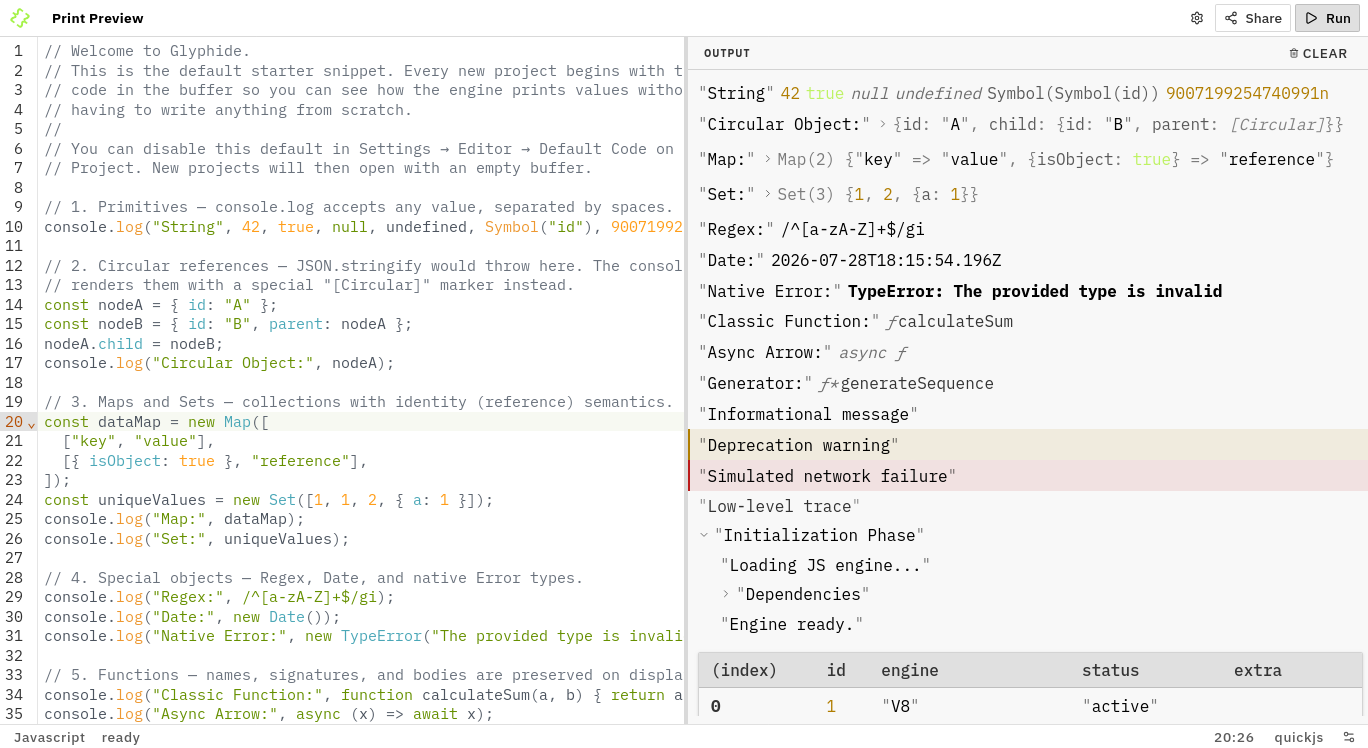
usage
Navigate to glyphide.com to start coding.
printing output
Unlike standard REPLs that automatically echo the last returned value, Glyphide requires explicit print statements to display output in the terminal.
- JavaScript: Use the standard
consoleAPI (e.g.,console.log,console.table, etc.). - Python: Use the standard
print()function.
You can see an extensive demonstration of how different data types and print methods are rendered by loading the default starter code: javascript & python. (Note: loading starter code is an opt-out feature in settings).
sharing
When you write code in Glyphide, it automatically syncs with the URL, making your project instantly shareable. You can share your script using:
- Direct Link: Copy the generated URL and send it to anyone to load your project instantly.
- Embeddable iFrame: Copy an HTML iframe snippet to embed your script in external blog posts or documentation.
- Files: Upload or download your code as local files.
migration
Glyphide provides a built-in migration tool, so if you have old links from legacy versions or JSoD, just open your link with glyphide.com and it will automatically convert it into a current format link.
examples
javascript
// Calculate compound interest
const principal = 1000;
const rate = 0.05;
const years = 10;

const result = principal * Math.pow(1 + rate, years);
console.log(`$${principal} becomes $${result.toFixed(2)} after ${years} years`);
python
# Calculate compound interest
principal = 1000
rate = 0.05
years = 10

result = principal * (1 + rate) ** years
print(f"${principal} becomes ${result:.2f} after {years} years")
technical overview
architecture
Glyphide is structured as a monorepo powered by pnpm workspaces and Turborepo. At runtime, code execution is completely isolated from the main UI thread by leveraging WebAssembly runtimes inside Web Workers.
packages
| Workspace Package | Type | Description |
|---|---|---|
@glyphide/editor | Application | SolidJS SPA code editor with EditorCore reactive state management. |
@glyphide/rpc-protocol | Package | Pure JSON-RPC 2.0 protocol contract defining Web Worker communication interfaces. |
@glyphide/orchestrator | Package | Main-thread engine manager controlling Web Worker lifecycles, execution timeouts, and RPC routing. |
@glyphide/quickjs-engine | Package | QuickJS JavaScript engine adapter executing code inside a WebAssembly sandbox worker. |
@glyphide/micropython-engine | Package | MicroPython engine adapter running Python code in a WebAssembly sandbox worker. |
@glyphide/mock-engine | Package | Test engine adapter for contract verification and unit testing without real code evaluation. |
@glyphide/integration-tests | Package | Cross-engine integration and security testing suite validating sandbox isolation and resource limits. |
@glyphide/url-migration | Package | Legacy URL parser and converter for upgrading JSoD and Glyphide V1/V2 links. |
running locally
prerequisites
- Node.js:
>= 24.0.0 - pnpm: managed via Corepack. Run
corepack enableto activate the correct version automatically.
scripts
Run all commands from the repository root using pnpm:
core workflow
pnpm dev: Start development mode across the workspace.pnpm build: Build all packages and applications with Turborepo caching.pnpm test: Execute unit and integration tests (Vitest).
quality & maintenance
pnpm test:security: Run cross-engine security audit test suite.pnpm typecheck: Perform TypeScript type checking.pnpm lint/pnpm lint:fix: Check and automatically fix formatting rules (Ultracite).pnpm knip: Check for unused code and exports across packages.pnpm nuke: Deep clean all build artifacts,node_modules, and lockfiles.
faq
is it safe?
Execution safety is a foundational principle of Glyphide. We ensure:
- WebAssembly Sandbox: Engines run inside compiled WebAssembly modules, restricting direct access to the host operating system.
- Worker Isolation: Code evaluation is isolated inside Web Workers, keeping execution strictly decoupled from the main DOM and application state.
- Resource Limits:
@glyphide/orchestratorenforces execution timeouts and memory boundary checks to mitigate infinite loops or memory allocation bombs. - Trust Required: You will always be prompted to confirm execution of untrusted code when loading from an external or shared URL.
While Glyphide provides a highly sandboxed environment, executing code you do not understand inherently carries some risk. Always review and verify the contents of shared scripts before choosing to run them.
is there a limit on URL length?
Yes. Glyphide has a hard limit on URL length (8000 characters) that cannot be bypassed. If your code exceeds this limit, the editor automatically switches to buffer-only mode, clearing the URL and stopping synchronization. Since your work is no longer backed up in the URL, you must download it to avoid losing data. For larger scripts, working with local files (Upload & Download) is the recommended workflow.
can i use third-party packages?
Glyphide currently executes pure JavaScript (QuickJS) and standard Python (MicroPython). External NPM modules or PyPI packages requiring native extensions are not supported due to browser Wasm sandbox constraints.